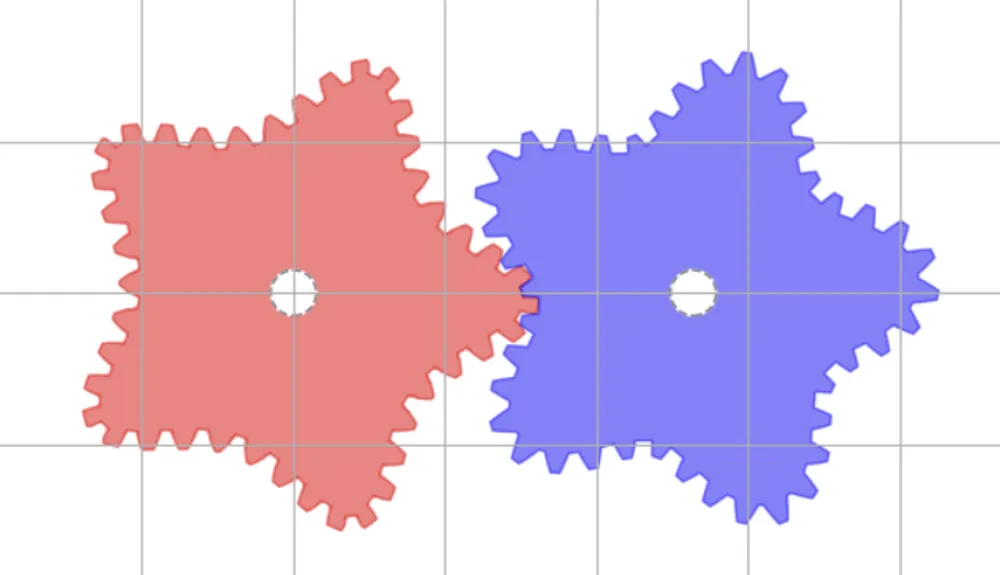
Non-circular gears and linkage mechanisms are theoretically fascinating subjects, often explained through mathematical formulas in textbooks and research papers. However, when attempting to actually design and test them, many people likely feel that the barrier to entry suddenly rises. This article is written for those who want to try non-circular gears or linkages at least once but got stuck with CAD or simply don’t know where to start.
The Burden of Trial and Error in CAD
When working with non-circular gears or linkage mechanisms in CAD, setting constraints and adjusting parameters is mandatory. Even if you just want to briefly check a simple movement, it takes significant effort.
Especially with linkage mechanisms, slight changes in dimensional ratios or joint positions can drastically alter the nature of the motion and trajectory. While CAD is extremely powerful for accurately designing the final product, its “heaviness” can often be a burden during the trial-and-error process of the initial design phase.
What You Really Want to Know in Early Design
In the initial stages of design, what you really want to know are the following points:
- Is this shape feasible?
- What kind of motion will it produce when actuated?
- Where are the obviously impossible or strained parts?
These are questions you want to grasp intuitively before detailed design. You don’t necessarily need accurate drawings or dimensions yet; there are many situations where you just want to see the movement to make a judgment. For such purposes, the ability to start experimenting the moment you open a URL—without getting bogged down in environment setup or configuration—provides value beyond mere functionality in the initial design phase.
Why the Browser?
The reason XymuActive runs in a browser is to minimize the cost of getting to the “trying it out” stage.
- No installation required
- Minimal environmental differences
- Shareable via a single URL
While a browser environment might not be a precision design tool, I believe it is sufficiently practical as a space for initial examination and understanding.
Tech Selection Based on Ease of Trial and Error
XymuActive utilizes Rust and WebAssembly for its numerical calculation components.
While C++ or Zig might be advantageous in terms of pure performance in many cases, this project prioritized the ability to safely repeat trial and error over being the absolute fastest.
In recent years, a development style involving using AI as an assistant to rewrite, test, and fix code has become common. In such an environment, having types and errors clearly shown is a huge help in isolating issues and debugging.
The reason for choosing Rust lies in its language characteristics: it makes problems explicit at an early stage rather than harboring undefined behavior.
The More Complex the Mechanism, the More “Cost to Try” Matters
In complex linkage mechanisms like the Theo Jansen mechanism, the large number of links and closed loops makes it difficult to intuitively grasp how differences in dimensional ratios affect motion.
When experimenting with such mechanisms in CAD, resetting constraints and recalculating becomes necessary, and even just taking a quick look at the movement can become a heavy burden. As a result, trial and error for the purpose of understanding the motion tends to become difficult.
With XymuActive, we aim to provide a form where even such complex mechanisms can be simulated immediately in the browser, with the primary goal of understanding the movement.
・Simulation of the Theo Jansen mechanism in the web app currently under development. The trajectory of the leg tip changes drastically depending on the link ratio differences.
The Stance XymuActive Aims For
XymuActive does not aim to replace CAD software or academic tools.
We want it to be a handy experimental environment for the entrance of design: to immediately try out an idea, check the movement, and decide whether to proceed to the next step.
To understand the ambiguity between theory and implementation by actually touching it.
Supporting that process is the purpose of this project.
First, Try Drawing a Gear in 1 Minute
If you want to actually check the movement of non-circular gears or linkage mechanisms, please use the tool below. No difficult settings or environment setup are required. Please utilize it as a place to first verify the motion.
Try the Simulation